4.5.2 Dip
Returns dip/azimuth from a SteeringCube
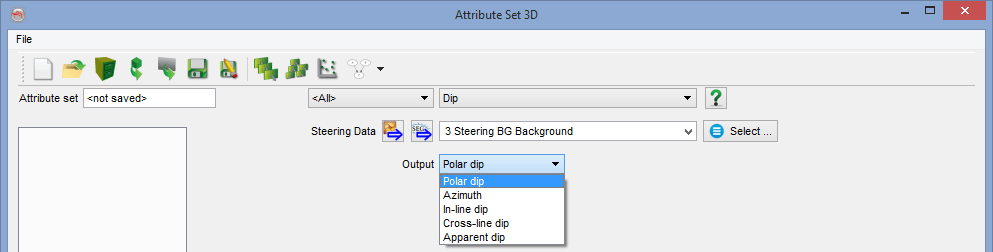
Description: The inline and crossline dips of a SteeringCube are transformed to the requested Output type (Polar dip, Azimuth, Inline dip, Crossline dip). When the SteeringCube was computed from seismic data sampled in time, the dips in a SteeringCube are apparent dips (slowness), and the returned attribute will also represent apparent dips. To compute real dips, please use the dip angle attribute.
Outputs
Polar dip: attribute converts extracted inline and crossline dips to polar dip, or true (geological) dip. The polar dip is the square root of the sum of (inline dip)2 and (crossline dip)2. The polar dip is thus larger or equal to zero.
Dips are given in μseconds/meters in time surveys (millimeters/meters in depth survey), since they are a ratio between a vertical length and a horizontal distance. The dip angle attribute may be used to convert the polar dip output into degrees.
Along a 2D line the polar dip will return the absolute value of the line dip, the dip along the 2D line.
Azimuth: attribute returns the Azimuth of the dip direction in degrees ranging from -180 to +180. Positive azimuth is defined from the inline in the direction of increasing crossline numbers. Azimuth = 0 indicates that the dip is dipping in the direction of increasing cross-line numbers. Azimuth = 90 indicates that the dip is dipping in the direction of increasing in-line numbers.
This output is not available in 2D.
Inline dip: returns the dip along the inline direction as extracted by the steering algorithm. It is the first stored component of the SteeringCube, in μs/m or mm/m.
This output is not available in 2D.
Crossline dip: attribute returns the dip along the crossline direction as extracted by the steering algorithm. It is the second stored component of the SteeringCube, in μs/m or mm/m.
This output is not available in 2D (use line dip for 2D survey instead).
Line dip: returns the dip along the 2D line. Computed steering lines are also two-component files with the first component equal to zero for all samples. The line dip is the second component.
This output is not available in 3D.(use inline dip and/or crossline dip instead)