3.7.5.1.1 Quick UVQ
The Quick UVQ horizon option can be used to quickly segment the seismic waveform along the interpreted horizon. The attributes and data selection are made automatically, contrarily to the standard NN training mode that request the user to define attribute and training locations (picks) before going into the NN training module.
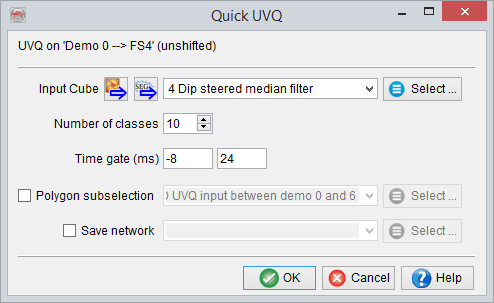
The sole window requests the user to select the input seismic data (2D or 3D according to the type of intepretation). Around 2000 input traces are randomly chosen to train the neural network. The waveform in a given time window is the main parameter to input, together with the output number of classes. It is highly recommended to save the output network.
The time window should match the length of the target of interest, and be extended on either sides by a few samples.
Example: You have a top reservoir horizon and the target is 50m = 32ms thick. An appropriate time window would be [-12, 44] ms along the horizon.
The number of class is hard to determine in advance. Too many classes will give redundant class centres, but too few classes will not match the seismic.
The 'OK' button will start the unsupervised Neural Network training. The training that results above 90% match could then be accepted to create output maps. The 'OK' button in the Neural Network Training window will automatically start processing the two outputs (Segmentation and match grids) on the 3D horizon. The processed grids are only saved to the database using the right mouse click on the processed attributes (Class, Match) of the horizon.
After training an additional Neural Network Info window will pop-up.(see above). This dialog gives a detailed report about the Neural Network training. The Display button in the Neural Network info dialog is used to pop-up a class center display in a 2D viewer (see below). The classes can be color-coded using the Color Table, and the color table can be displayed in the 2D viewer by clicking on the 'show classification' button.
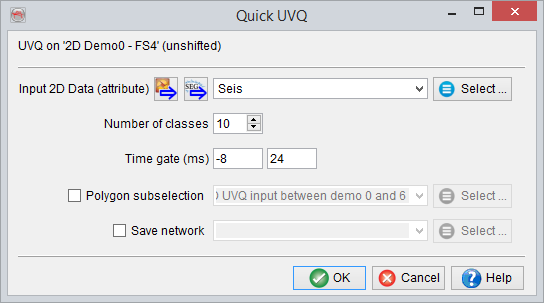
2D QUICK UVQs
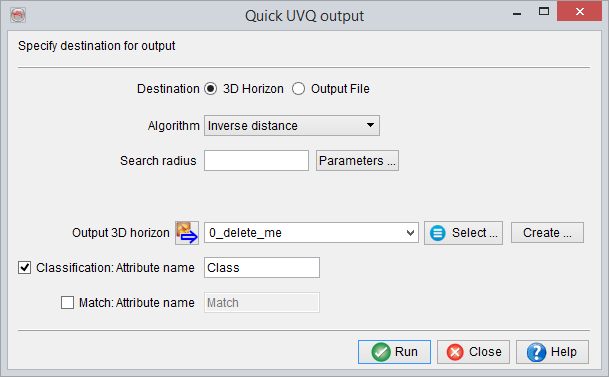
The similar workflow is also available for a mapped 2D seismic horizon. Similar settings are required and the processing steps are also the same (as explained previously). After the Neural Network training is finished, the system will prompt to grid and save the classification and the match grids to a 3D horizon. Select or create a 3D horizon to process the classification and match maps.