8.3.4 Well-Log - based Generation
Well-log based section can be either full or partly full of well log data, which has been upscaled/blocked at a constant size. This option is recommended for modeling a realistic overburden which is required for ray-tracing when working with prestack data.
Right-clicking inside the Layer Description panel of the Layer Modeling window, will bring up the following popup:
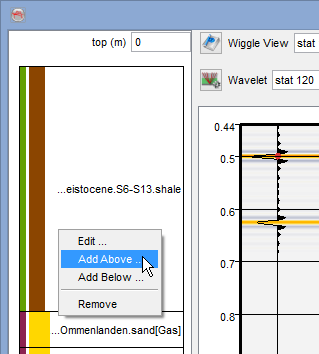
Clicking either 'Add Above...' or 'Add Below...' will bring up the following selection option:
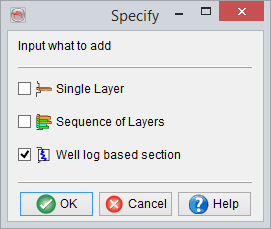
Choosing 'Well-Log based section' will bring you here:
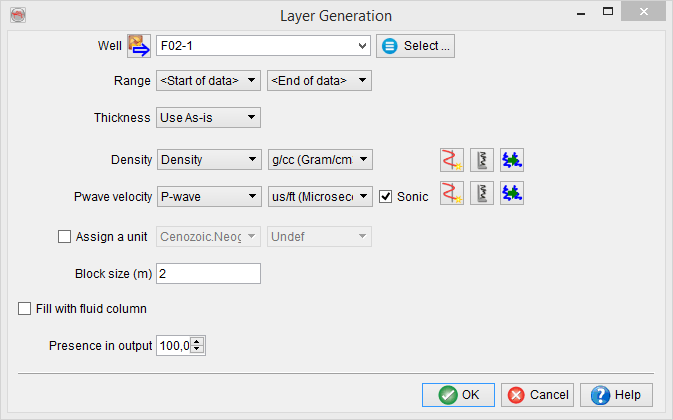
And selecting a well will allow auto-input of any available logs. Well-log based section can be either full or part of well log data, which has been upscaled/blocked at a constant size. This option is recommended for modeling a realistic overburden which is required for ray-tracing when working with prestack data. See following example for F03-4:
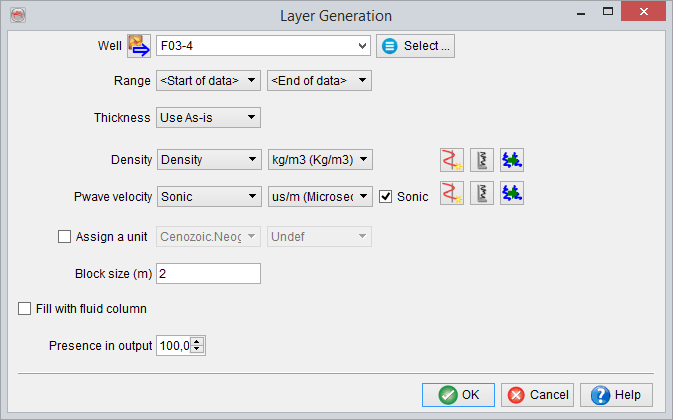
The example above shows Layer Generation window for adding a well-log based section to a model description. Once the well is selected, define the interval bound by formation tops to be used. Thickness of the modeled interval can be Used as-is, or modified using one of the three options Cut from Top, Cut from Bottom or Stretch/Squeeze. If modified it can be set to a Constant, Range or Random (Uniform or Gaussian distribution). For example, Cut from Top in conjunction with Range or Random can be used to model subcropping strata, and Stretch/Squeeze along with Range or Random - to model thickness variations.
The next section of this window allows to choose well logs corresponding to the layer properties used in the modeling. Note that all used properties are required to have a log selected. Missing logs can be either created ( ) without having to exit SynthRock or imported using the Well Manager. Selected log can be viewed (
 ), or changed (
 ).
).
Optionally, a well-log section can be assigned to a specific unit by selecting both formation and lithology member. If no unit is assigned, a name derived from bounding formation tops is displayed in the modeling description part of the Layer modeling window, but an actual layer name as well as lithology are left undefined (‘-’). Default colors for undefined formations and lithologies are white and grey respectively. Note that if no unit name is assigned, the subsequently created layers can not be used for plotting Attributes vs model properties or be a target quantity during the HitCube inversion.
All the logs are upscaled/blocked at the user-defined Block size. Note, that when modeling large intervals, Block size should be chosen with care as block sizes which are too small significantly increase time to generate pseudowells and memory consumption.
If Fill with fluid column is checked, the fluid column has to be Defined. Presence in output controls the percentage of wells having the given well-log based section.