6.2.2 Stratal Amplitude
Stratal Amplitude is a processing tool available to compute statistics (min, max, rms, etc.) from an attribute along a horizon or between two horizons. The window can be launched from Processing > Create Horizon output > Stratal Amplitude. The output will be stored as horizon data (grid) saved on the top or base horizon.
This feature operates based on a single-trace calculation only (ie: no step-out). For multi-trace calculations (using step-out), you are advised to use the Volume Statistics attribute.
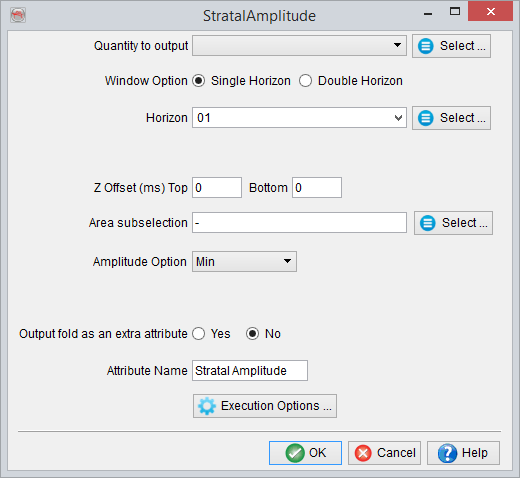
In this window, select the input attribute from which the values will be extracted. The extraction may be guided by a single horizon (Single Horizon) or between two horizons (Double Horizon).
- Single Horizon is used to extract amplitude along a horizon within fixed window relative to the point.
- Double Horizon is an option of amplitude extraction between two horizons. In this case, the Z-offset parameters (see below) may be defined to increase or decrease the area defined by the horizons.
- Z-offset is the offset window specification above (negative values) or below (positive values) a horizon to restrict or extend the calculation interval. For example:
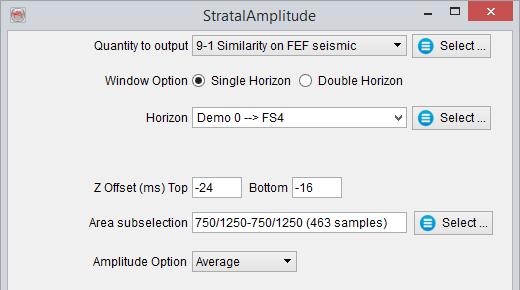
Settings to extract the average amplitude between 16 and 24 ms above ('-' values) the selected horizon.
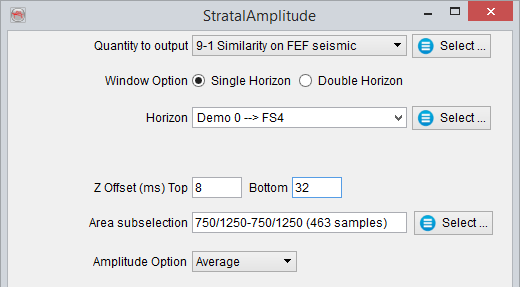
Settings to extract the average amplitude between 8 and 32 ms below (for positive values there is no need to prefix with a '+' sign) the selected horizon.
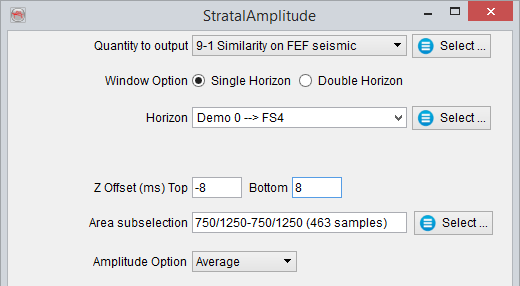
Settings to extract the average amplitude 8ms equally around the selected horizon.
- Area subselection is used to specify the area within which the attribute is output.
- Amplitude options are the available statistics for amplitude extraction. Five amplitude statistics are available: Min, Max, Average or RMS and Sum.
- Output fold as an extra attribute optionally outputs data fold, i.e the number of point used for the processing, as separate horizon data.