6.1.1.4 Multi-Cube Data Store
Multi-components cubes for some attributes (e.g Spectral Decomposition, Steering attributes) can be created.
First, create your attribute in the attribute engine.
Create the volume output: Go to Processing > Create Seismic Output > Attribute > Multi-cube data store and select a volume that contains multiple components (here, Spectral Decomposition as example):
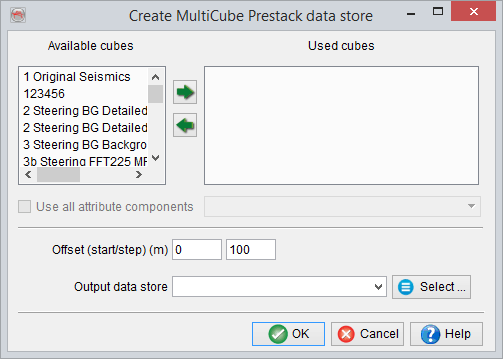
Select a component of the cube and assign it a 'pseudo-offset' value. Repeat this process of pseudo-offset assignment for all of the components that you wish to be present in the output, name it and press 'Go'.
Multi-component cubes can be exported as SEG-Y or simple ASCII file but only one component per output. The choice of which component is given to the user during the export process.
How to display the Multi Component Volumes?
Whenever displaying a multi-component attribute volume on an inline/crossline, the component selection dialog box (below) will pop up. In this dialog one or more outputs to be displayed on the same section must be selected.
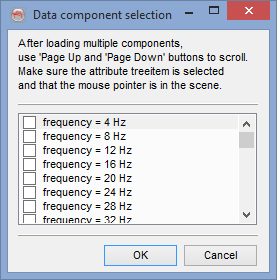
Once several components are selected and displayed for an element (e.g. an inline), place the mouse in the scene, and use the keyboard's PAGE-UP/PAGE-DOWN keys to view the next/previous slice in real-time.