4.3.11.4 Import CBVS Cube
Seismic in CBVS format can be import either directly from cbvs file or from other survey(s) as shown below
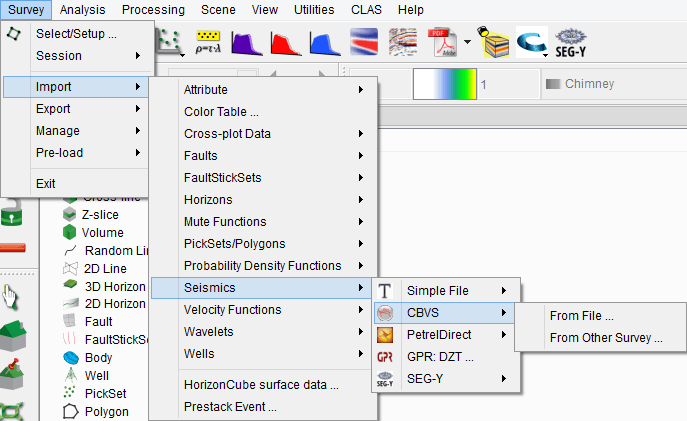
From file
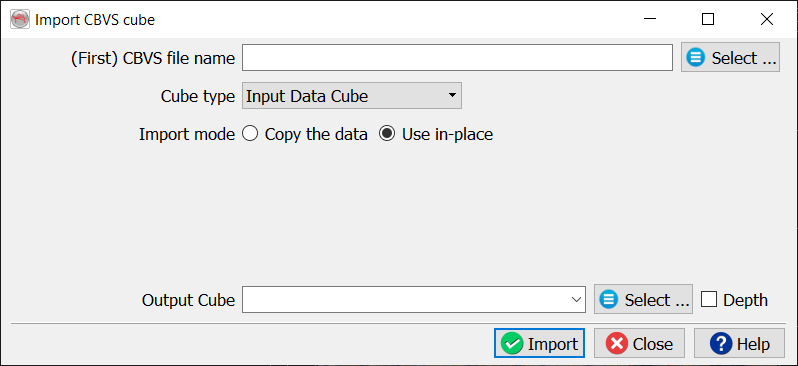
This module enables exchange of data between the OpendTect projects. The original CBVS (Common Binary Volume Storage) file can be located with a standard file browser. Some CBVS volumes are stored in several sub files. These can be recognized by the ^01 or ^02 (etc.) in the filename. To import the complete volume, select the base file without any ^xx marks.
The Cube type needs to be specified in order to give it the correct label for the software.
The Import mode indicates if the file should only be left at its original place and just be linked to the current survey (Use in-place), or if the volume should be copied entirely into the current survey directory (Copy the data). Moreover, while importing, the volume can be sub-selected (selected inlines/crosslines/time ranges) by pressing Select button in front of the Volume subselection field. If the data contains the Null traces, either discard or pass the traces by selecting the respective radio button. Before, importing the CBVS volume, the scaling (16bit, 32 bit etc) can be applied to the volume. The Output Cube field corresponds to the output volume name (that will be available in Manage Seismic window) for the input file.
From other survey(s)
Seismic cubes in cbvs format can also be imported from other survey(s)
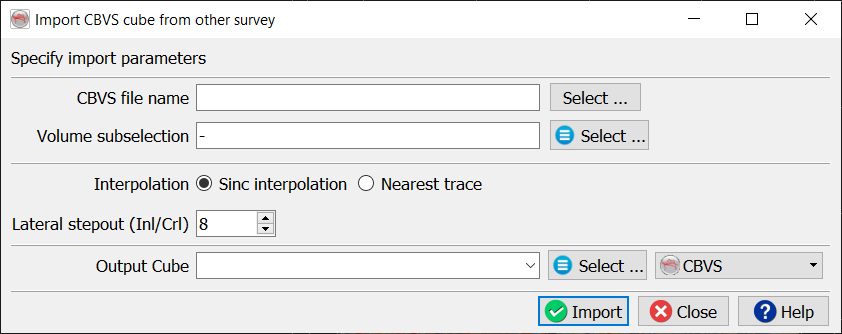
Few changes can be made prior to import the file: The volume subselection, the type of interpolation (sinc interpolation or nearest trace) and the stepout in inline and crossline.