4.5.12.2.1.1 Merge 2D Lines
Two 2D lines can be merged together to create a single 2D line. The  icon opens the merging window. The merge can be either of 2 lines with about the same geometry, or to append two (consecutive) lines to each other.
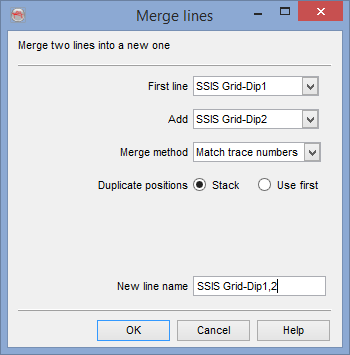
There are three alternative merging methods:
- Match trace numbers: Assumes the lines are at the same location, containing different attributes to be stacked and referenced using the same trace number array.
- Match coordinates: Same as above, but with different trace number arrays. Then the match will be based on coordinates, with a search radius to match the traces. Please note that traces will be renumbered in this mode.
- Bluntly append. Append the line specified at the "Add" field line after the "First line". Please note that traces will be renumbered in this mode.