Internal Python installation for use in OpendTect
When running the OpendTect installer there is the option to install the Python environments. The installer will auto select the Miniconda3 environment and also auto select the Python CUDA 11 environment for training on the Nvidia GPU. For training on CPU only the Math Kernel Library (MKL) Python environment should be selected. The Python CUDA 10 environment is now obsolete and will no longer receive security updates. Users are encouraged to uninstall it, and replace it with either CUDA 11 or CPU only Python environment. Also note that OpendTect does not support the Python CUDA 10 environment from 6.6.6 and onwards.
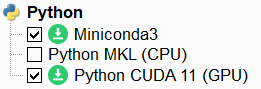
Figure: Install Python environments with the OpendTect installer
To use these Miniconda3 environments select Internal (default option) in the Set Python Settings window of OpendTect.
If you have your own miniconda3 or anaconda3 environment you might want to consider to
If you have a system Python installation (no miniconda3 or anaconda3) then you might want to consider to