8.3.2 Model Definition
The modeling will distinguish three types of nodes:
- Meta-formations These nodes are specific by the fact that they do not have lithologies on the level below, but formations. They are used to control the order of appearance of the formations during the simulation. For instance in the example below the top node "Chalk" is used to make sure that the "Ommenlanden" formation is always modeled on top of the "Texel" formation. Optionally one can also set the probability of presence of the entire node.

- Formations These nodes are specific by the fact that they only have lithologies on the level below. The simulation will add blocks taken from the leaves from bottom upwards according to the thickness and probability of presence settings of the leaves, until the thickness of the formation is reached. See example below:

Optionally the thickness of the formation can be constrained by the number of blocks, instead of the sum of their thickness. See example below:
- LeavesThe leaves are the key item of the pseudowell modeling. Each leave that is modeled is a small layer, stacked on top of the previously created layers of the pseudowell. It belongs to a given formation, has a top depth (Z), thickness, log values, and a given fluid content. See example below:
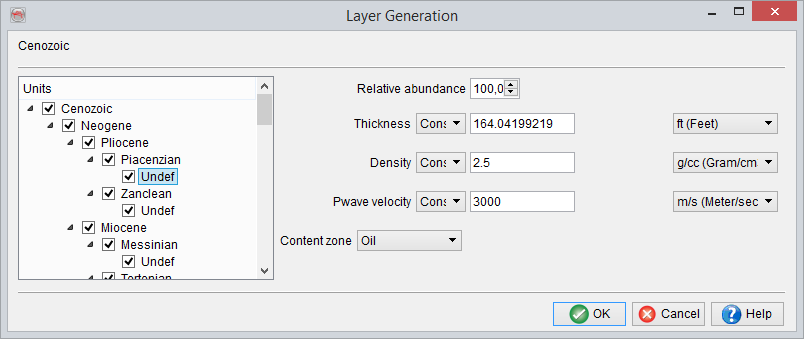
The relative abundance defines the probability to find a given lithology in a formation. It is used to draw the lithology type to add when inserting a new block in a formation, after the previous. It can be used to model a net-to-gross ratio, but the user will need to make sure that the sum of the relative abundances of all leaves is equal to 100%.
It is possible to specify if some fluid is present or not by selecting the box Fill wth fluid column for the meta-formations and formations. If the option is selected, the characteristics of the fluid column have to be Defined. It will consist in at least one fluid.There can be as many fluids present as you defined in the Manage Contents window. This fluid column will be present in every generated pseudo-wells if the presence in output is 100%. In addition to the probability of occurrence, its thickness can be set to constant or varied randomly or within a user-defined range.The fluid column can be continued into the layers below if for example the layer below is also a reservoir for the case if the thickness of the fluid column exceeds the total thickness of the layer where it is defined in some pseudo-wells.

At the lithology level, the fluid content can be simply one of the fluids available in the Content manager or a fluid column can also be defined.
All numerical values can be set in the following ways (select the desired method and press set if applicable):