5.1.2 Attribute Set Toolbar
The attribute set toolbar comprises the following icons.

Also accessible via the File menu, these are, from left to right:
- New set clears the window to create a new attribute set. The attribute set name can be specified when saving it (press OK, or select File - Save set menu option).
- Open set opens a previously saved set in the current project (from the directory Attribs/).
- Open default attribute set. Filenames for input data must be re-specified.
- Import attribute set from another survey. Filenames for input data must be re-specified.
- Reconstruct set from job
- Save set saves the "active" attribute set in the Attribs/ directory of the current project.
- Save as set saves the "active" attribute set in the chosen folder
- Redisplay element with current attribute is used for direct display of the selected attribute on the active display element (shown in reverse video in the tree). The main graphic interaction buttons and options remain active while the attribute set window is open, so the active element can be changed. However no new element can be added to the tree
- Evaluate Attribute allows the automatic variation and evaluation of attributes and attribute parameters. If you have an "active" attribute and the current display element is a slice (inline, crossline or Z slice) or a horizon, a new window will pop up where it can be specified how to vary the parameters of the displayed attribute. For example, Spectral Decomposition:
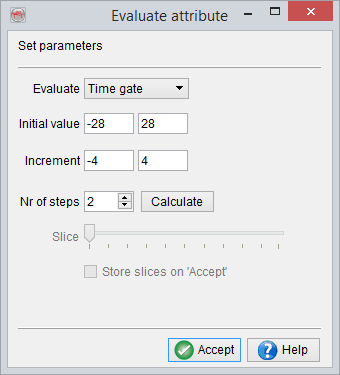
Here six slices are created, with time gates of [-4,4], [-8,8] etc.... Use the slider to move through all the slices. When an attribute has been evaluated on a surface, the parameter can be updated in clicking on Accept. Enable this by checking Store slices on Accept.
As shown above, the "Evaluate Attributes" set contains a general selection of various attributes. It is intended as a guide or starting point for a scan through the wide range of different attributes and may be a starting point for an effective attribute analysis.
For more information on Evaluate Attribute, watch the tutorial on the OpendTect YouTube Channel.
- Cross-evaluate attributes Allows for the cross-evaluation of parameters within the attribute.
- Crossplot attributes allows to crossplot attributes from the current attribute set and saved volumes. Multiple attributes can be selected. The attribute values are extracted at picked locations (see how to create a pointset). Once attribute values are calculated, a crossplotting table is generated and crossplot(s) can be achieved.