4.3.11.1.2.1 SEG-Y Import Preparation
SEG-Y import preparation starts with the SEG-Y tool window.
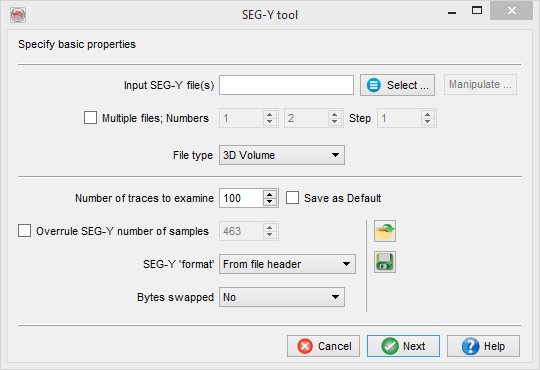
Input SEG-Y file(s): Select a SEG-Y file to import.
Import 3D pre- or poststack data from multiple SEG-Y files: files must contain consecutive blocks of inlines and be indexed as filename_1.sgy, filename_2.sgy...
- Select one of the files;
- replace the file index by a wildcard * in the input field: filepath/filename_*.sgy;
- toggle on Multiple files option and specify the number of files to be merged.
Import multiple 2D lines with pre- or poststack data: files must contain individual 2D lines and be indexed with the respective line names as filename_linename1.sgy, filename_linename2.sgy...
- Select one of the files;
- continue through the wizard with just one file selected until SEG-Y Import window (last step);
- SEG-Y Import window: check option Import more, similar files;
- 2D SEG-Y multi-import window replace line name in the file name with a wildcard #L (see SEG-Y Import page for more details)
Manipulate...: opens Manipulate SEG-Y file window where text, binary and trace headers of a SEG-Y file can be edited.
Multiple files (default = toggled off): toggle on if a single 3D dataset (pre- or poststack) is imported from multiple SEG-Y files (see above how to Import 3D pre- or poststack data from multiple SEG-Y files):
- Numbers: specify indexes of the first and the last files as well as index Step.
File Type: specify which data is contained in a SEG-Y file(s).
Number of traces to examine (default=100 traces): a number of traces at the beginning of the file to be analyzed in SEG-Y Examiner. Looking at the output is strongly recommended but not mandatory for a successful import. Enter 0 to skip SEG-Y Examiner.
- Save as default: (optionally) check to save the Number of traces to examine in your user settings.
In most cases you can press Next after you have selected input file(s). Consider overruling options listed below (information coming from the file(s) itself) only if you have a proiri knowledge about problems with the file(s).
Overrule SEG-Y number of samples (default = toggled off, i.e. standard locations are used: byte 21 of binary header / byte 115 of trace header): (optionally) overrule the number of samples per trace.
SEG-Y 'format' (default = byte 25 of binary header): (optionally) overrule data format.
Bytes swapped (default = toggled off, i.e. big-endian byte order used): (optionally) toggle on to use little-endian byte order for reading data.
Most header values and data samples are written using several bytes for each word/sample. Therefore knowing a correct byte order is a necessity. All SEG-Y standards (Rev. 0, 1 and 2) require using big-endian byte order. Occasionally one can run into data written using little-endian (reverse) one. Using standard SEG-Y data formats for reading such data results in unexpected scanned values of trace headers and unexpectedly large sample values (check the histogram in SEG-Y Examiner).
 Store this setup: save a SEG-Y import setup at the survey data root level.
 Use saved SEG-Y setup: retrieve one of the stored setups.