4.3.14.1.2 Logs
Logs of a single well can be imported to OpendTect as LAS or pseudo-LAS file via Survey > Import > Wells > ASCII > Logs... The import of well logs requires the well track to be imported first.
Logs can also be imported or computed from the well manager.
For bulk import of well logs please refer to this page.
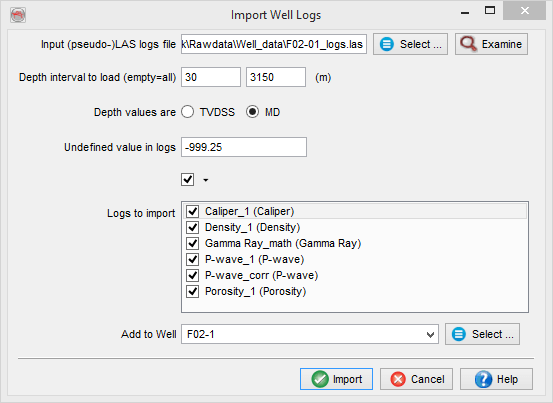
Import Logs: The LAS file should contain depth values as MD or TVDSS. Alternatively, the log files can be pseudo-LAS, meaning LAS (with one line of data per depth value) with the header replaced by a one-line definition: "Depth Gamma Sonic" etc (without quotes). Log names should be separated by blank characters (space or tab). For both LAS and pseudo LAS, the following units can be recognized. The recognition process is case insensitive.
Once the file has been selected all recognized logs will be listed in the Select logs section. Only the highlighted logs will be imported. Be careful that two logs do not have the same name. The depth interval can be limited to a sub-range. The start depth, stop depth and step written in the LAS files are not used; instead the depths found on the same line as the amplitudes will be used.
In pseudo LAS, units should follow directly behind the log name in parentheses, e.g. Depth(ft) Density(g/cc). Below are examples of text string that will match units:
- Time: s, msec, µsec
- Distance: m, feet, f, ft, in
- Density: kg/m3, g/cc, g/c
- Velocity: m/s, ft/s, f/s, feet/s, km/s
- Sonic: s/m, us/ft, µsec/f, us/m, usec/m
- Acoustic Impedance: kg/m2s, kg/m2us, g/ft2s
- Fraction (porosity, water saturation): %, PU, or blank for unitless
- Permeability: k
- Gamma Ray: API
- Electric Potential: V
- Resistance: ohm
- Compressibility: 1/Pa
- Temperature: K, deg.C, deg.F
- Pressure: Pa, bar